
Search "POS with scale integration" and every result says the same thing: yes, we support scales.
Then you buy the scale, and find out it doesn't work with your model of their terminal, or it needs a plan you're not on, or it needs a $32-a-month bridge, or their own support article quietly says the thing can't be done at all.
So we read the documentation instead of the marketing. Every claim below is from the vendor's own support pages, quoted and linked.
The short answer
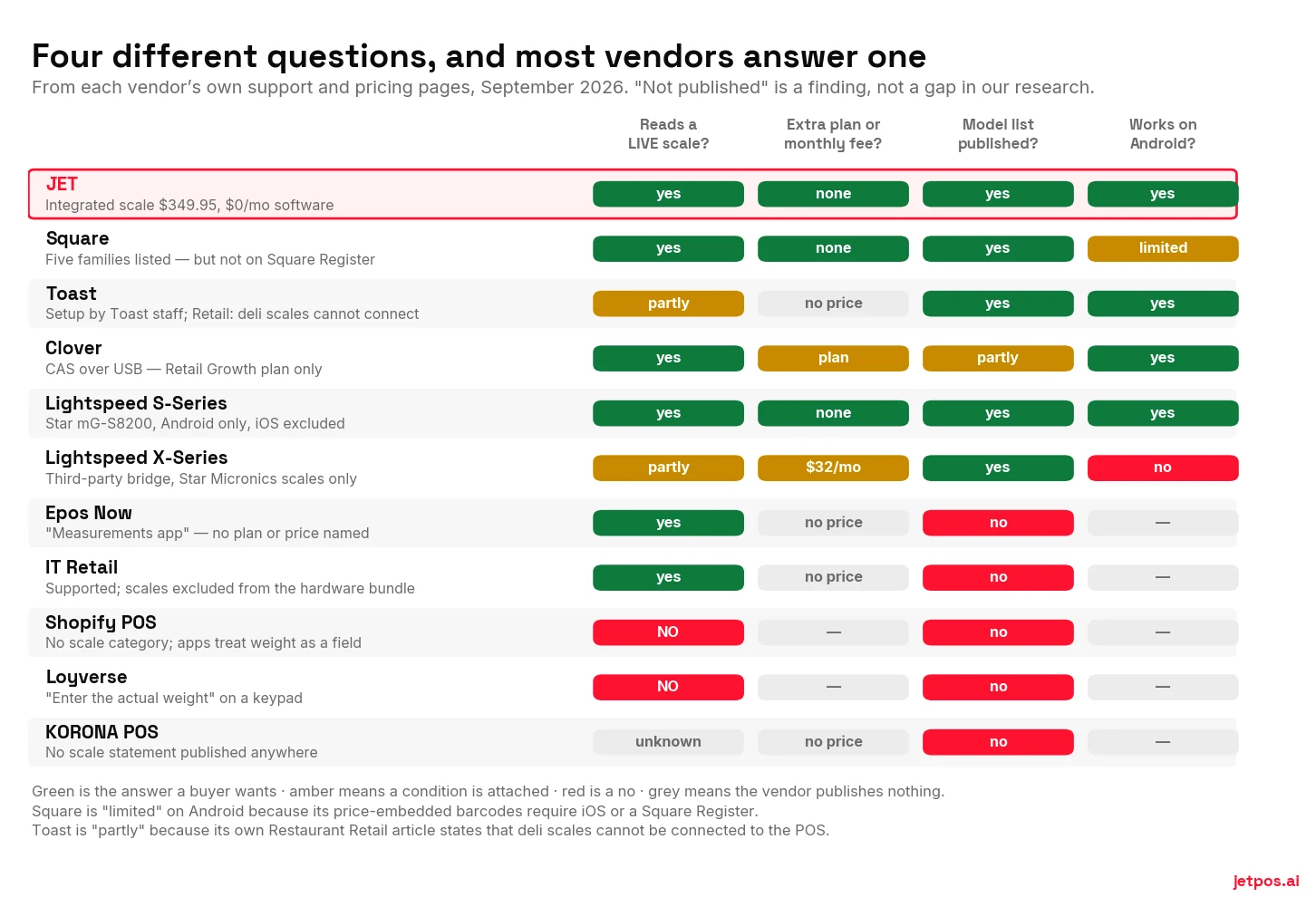
Square, Toast, Clover (Retail Growth plan only), Lightspeed's Android S-Series, Epos Now, IT Retail and JET read a live scale — each from a short, specific model list, not "any scale."
Shopify POS and Loyverse have no native live-scale support at all. Both rely on typing the weight or scanning a barcode a standalone scale printed. KORONA publishes nothing.
The three questions that actually matter: which exact models, on which of your devices, and on which plan. Almost nobody answers all three on their website.
Who actually reads a live scale
Square — the fullest list, and the most revealing
Square publishes a genuine compatibility matrix, which is more than most do. It names the Brecknell 6710U, Star mG-S8200, CAS SW-RS, CAS PD-2 and the Datalogic Magellan 9000 series.
Read the matrix properly and three things fall out:
- All three USB bench scales are marked "does not work" with Square Register — the $899 flagship.
- The one Bluetooth scale doesn't work on Android, even though Star documents that same scale as Android-compatible.
- Price-embedded barcodes need iOS or Square Register. A Square moderator confirmed it in November 2025. Not Android.
Square also documents that scales need non-default hardware settings — Brecknell in MULTI mode, CAS in ECR-5 mode — and that the app "can pair with only one scale at a time." All perfectly reasonable. None of it is on the pricing page.
Toast — where the documentation argues with itself
This one deserves care, because Toast is the biggest name in restaurant POS and its own articles disagree.
Toast's setup article says: "Toast uses both the Brecknell 6710U scale and the new CAS PD-II scale," and that setup "must be completed by the Toast Customer Care team for either scale."
Toast's certifications article lists Brecknell and Detecto as not NTEP-compliant — while the setup article recommends a Brecknell. It also says CAS scales are only NTEP-compliant if one of the two built-in displays faces the guest and the tare function is disabled, and that single-display CAS scales are not compliant with Toast "even if that display faces the guest."
"At this time, deli scales cannot be connected to the POS. Only the weighed item setups described above are compatible with Toast." — Toast's own support article on weighed items in Restaurant Retail.
What you get instead is barcode-based: Toast reads embedded price, weight and price-composed barcodes from "any scale vendor that follows the GS1 spec." That's a real workaround and it works — but it means buying a label-printing scale, not connecting a counter scale, and those start around $965.
We're not calling this dishonest. Large products have many configurations and documentation drifts. We're saying: if you are buying a scale for Toast, get the answer for your exact configuration in writing before you spend the money.
Clover, Lightspeed, Shopify, Loyverse
Clover connects a CAS scale over USB, on the Retail Growth plan. Scale support is a plan feature, so price the plan, not just the scale.
Lightspeed splits in two. The legacy Android S-Series supports the Star mG-S8200 — on Android only, iOS explicitly excluded. The current X-Series needs a third-party bridge called Hyperspace at $32 a month per store, which supports Star Micronics scales only. If you already own a Brecknell or a CAS, it will not work. Without the bridge, Lightspeed's documented workflow is to "change the quantity sold to the weight listed on your scales" — typing, by hand.
Shopify POS has no scale category at all. Its pricing page doesn't mention scales or weight. Third-party apps exist at $9 to $39 a month, and neither of the two we checked documents a physical scale connection — they handle weight as a field, not as a device.
Loyverse is the honest one. Its instruction for selling by weight is to "enter the actual weight (e.g. 2.8 for 2.8 kg)" on a keypad. It's a free POS and it doesn't pretend.
What three years actually costs
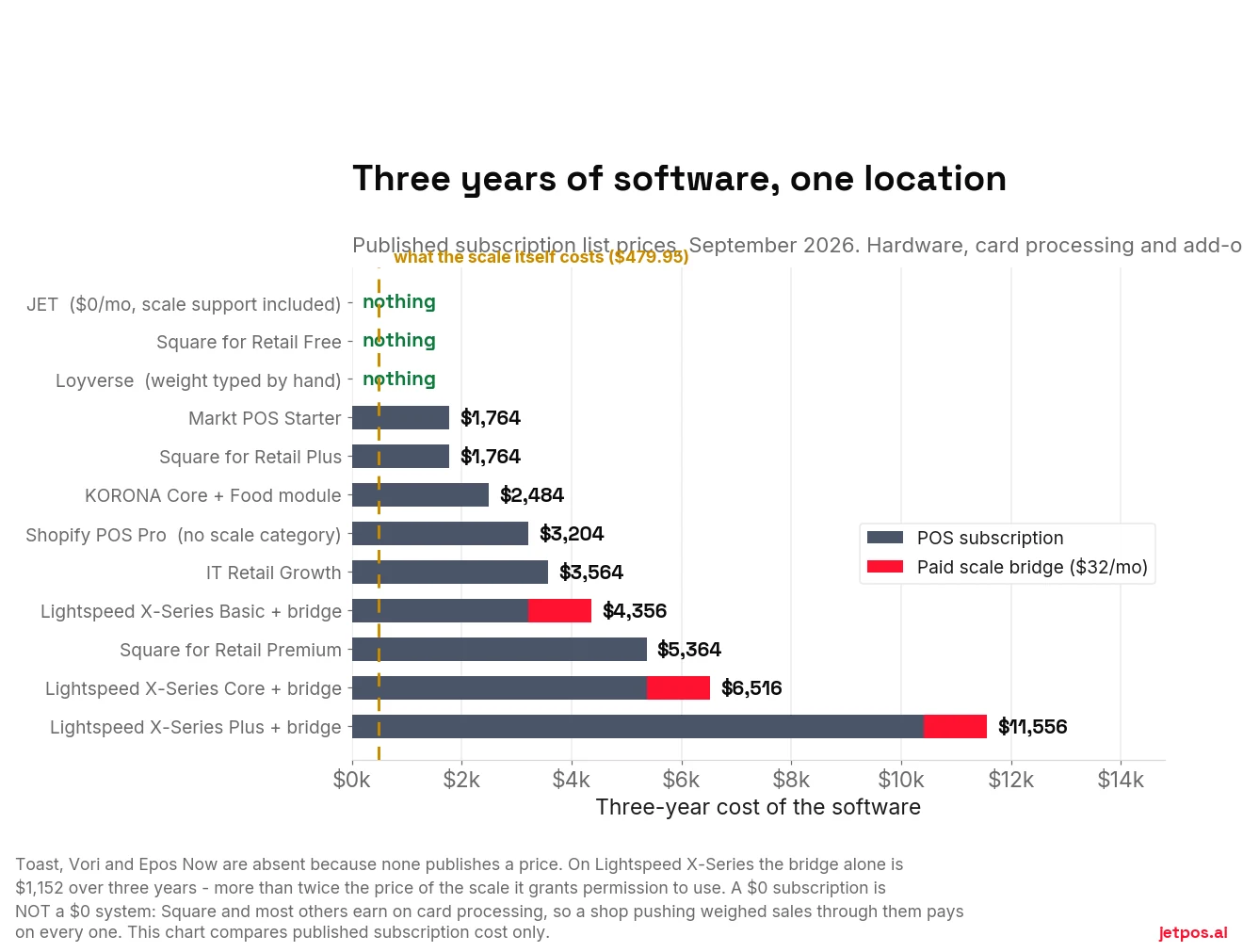
That caveat matters enough to repeat. Comparing subscription lines alone flatters anyone who makes their money on payments instead. JET is $0/month and takes no percentage of your card sales — but the honest comparison is total cost over three years, which is what the no-monthly-fee guide works through properly.
Is Android a problem? No — and iPad is worse
Worth addressing directly, because JET is Android and you'll hear this objection.
Four of the largest POS platforms in the world read a live scale on Android hardware. Toast's terminals are Android. Clover's devices are Android. Lightspeed's S-Series supports its scale on Android and not on iOS. Square's three USB scales all work on Android with a Square Reader. And the USB standard itself defines a vendor-neutral scale interface — HID Point of Sale usage tables, usage page 0x8D, with a defined "Data Weight" field — implementable by any operating system with USB host support.
Two things genuinely constrain you, and neither is Android:
- A legacy RS-232-only scale. Serial protocols built for 1990s cash registers have thirty years of Windows plumbing behind them. If you already own one, you'll find more Windows options. That's a legacy-hardware problem being mistaken for an operating-system problem — and it argues for buying a USB scale, not a Windows POS.
- Vendor feature-gating. Square's price-embedded barcode parsing is text handling on scanned input; the barcode arrives as keyboard input whatever the OS. Restricting it to iOS and Square Register is a product decision, not a technical limit.
And the part the market has backwards: iPad is the most constrained platform, not Android. Lightspeed S-Series scale support is Android yes, iOS explicitly no. The X-Series bridge states you cannot use it with an iPad or a Mac. iPadOS gives third-party apps nothing like Android's USB host access.
How it works on JET
Our row in the table above, spelled out so you can hold us to it.
The hardware. The JET Integrated Weighing Scale is $349.95, one time. It weighs 0.1 to 30 kg, has a stainless platform and a digital display, and ships with the POS cable and power adapter in the box. Free shipping across North America, 1-year warranty, 30-day money-back.
The software. Open an item, turn on the Weighing toggle, set the price per kilo. That's the setup. At the counter the weight arrives from the scale and JET does the multiplication — the priced line lands on the ticket with nothing typed.
The plan. There isn't one. JET's software is $0 a month with every feature unlocked, so weighing isn't behind a tier and there's no add-on to buy. No bridge, no per-store fee, no percentage of your card sales.
Approval. JET's scale is an approved trade device for both the United States and Canada. Because approval is the thing that decides whether you can legally price a sale with it, don't take that from a marketing page — ask us for the NTEP Certificate of Conformance number and the Measurement Canada approval number before you order, check they're on the plate when it arrives, and confirm they satisfy your own state or province. That's the advice we'd give you about any vendor, including us.
Android only. No iOS build. If you're committed to iPads, we're the wrong system.
The barcode scanner is not included with a station. It's a separate accessory, and merchants have been surprised by that, so we'd rather say it here.
No kitchen display system. JET routes tickets to a kitchen printer. If you need screens, we've written the honest comparison, and part of it argues against us.
One scale, one till. If you're running a multi-lane grocery front end with in-counter scanner-scales, that's a different class of system and you should be looking at the ones built for it.
What your kind of shop actually needs
"Supports a scale" means different things depending on what you sell. Four shapes, and the one question that decides each.
You weigh nearly every sale, so you need a live bench scale at the till — not a label printer in the back. The decisive question is whether the POS reads the scale on the device you'll actually have at the counter, and whether tare works the way you serve.
Watch the certification detail here specifically: Toast documents that a CAS scale is only NTEP-compliant with its POS if a display faces the customer and tare is disabled. If you serve into customers' own containers, disabled tare is a real operational problem, not a footnote.
You probably need both: a live scale at the counter and a prepack label scale in the back for what goes into the case. Those are two different machines and two different integrations, and vendors routinely quote one while you're asking about the other.
Be precise when you ask. "Do you support scales?" gets a yes from everyone. "Do you read a live bench scale at the till and scan GS1 embedded-weight barcodes from a prepack scale?" separates the field immediately.
Live scale, and tare is the whole game — your customers bring containers. This is the configuration most exposed to a vendor changing its mind: in August 2025 Square removed manual tare entry whenever a scale was connected, and refill shops that had built a multi-container workflow around it lost that workflow overnight.
Ask specifically how tare behaves, and whether it's yours to configure.
Mostly you don't need this at all — packaged goods scan, and a scale sits idle. It matters only if you run a hot case, a slicer, loose candy or bulk coffee.
If you do, the thing to avoid is buying a POS tier for the scale. Scale support is a plan feature on some systems, so a handful of weighed sales a day can push you onto a subscription that costs more than the whole weighed category earns. Count your weighed sales for a week first — under 25 a day the answer is usually no.
What actually goes wrong after you buy
The failure modes aren't the ones you'd guess. None of these is about a cable.
In August 2025, merchants on Square's own forum reported that after a POS update, manual tare entry stopped being available whenever a scale was connected. A Square employee attributed it to a regulator's requirement — when a scale is connected, the scale's reading must be the definitive measurement.
The operational consequence was specific. Bulk-food shops whose customers bring their own jars had been weighing several empty containers, noting the tares, serving other people while customers filled them, and re-weighing at the till. The change forced one container at a time. Several posters said they'd start looking at other providers.
This wasn't a bug. It was a deliberate, compliance-driven, global change to a workflow shops had built around, with no opt-out. It's the clearest available illustration that the terms of your scale integration can change under you, and you will not be consulted first.
The scale that connects but doesn't read. Merchants report scales that pair correctly and then do nothing when an item is scanned — working only when the item is selected by hand. One merchant on Square's forum described exactly that in April 2021, was told it was being looked into, and returned the scale two weeks later having heard nothing further. Treat these as merchant reports rather than verified fault rates, but ask the vendor what its support path looks like when the two devices technically connect and still don't work together.
The mode nobody mentions. Scales ship in a default protocol mode that often isn't the one your POS expects. Square documents that Brecknell scales must be switched to MULTI mode and CAS scales to ECR-5 mode before they'll talk. It's a menu setting, it takes two minutes, and it's the single most common reason a correctly-purchased scale appears dead out of the box. If your vendor can't tell you which mode, that's a signal about how much they've actually tested.
The certification conditions inside the integration. Toast documents that CAS scales are only NTEP-compliant with its POS if one of the two built-in displays faces the customer and the tare function is disabled — and that a single-display CAS scale isn't compliant with Toast at all, even if that display faces the customer. Whether your setup is legal can depend on a software setting, not just on the scale you bought.
Who owns the problem. With a bench scale, a POS and sometimes a bridge app, you have two or three vendors and a ticket that can bounce between them. The version with one supplier for the scale and the software isn't automatically better — but it does mean one phone number.
The five questions to put to any vendor, in writing
- Which exact scale models do you support? A model list, not "most scales." If they can't name models, they haven't tested any.
- Does scale support require a paid plan or an add-on, and what does it cost per month? Ask even if their site says nothing — especially then.
- Does it work on the device I already have? Square's own matrix is the cautionary tale: the flagship register won't take the bench scales.
- Who performs the setup, and is there a charge? Toast requires its own care team to do it.
- What happens if you push an update that changes the weighing workflow? In August 2025 Square removed manual tare entry whenever a scale was connected, citing an Australian regulator's requirement — a deliberate global change, no opt-out. Merchants who'd built a bulk-refill workflow around tare had to rebuild it. Ask what your notice period is.
What we'd do on Monday
Before you spend anything: email your current POS vendor those five questions and see how many come back with an actual answer. That reply tells you more than any comparison table, ours included.
If the answers are good, buy the scale they name and keep your POS. If they're evasive — or if the answer is a monthly fee larger than the benefit — then you're not deciding about a scale any more, and the payback arithmetic is where to start.
For a cross-vendor view with its scoring method published, WHICHpos compares no-monthly-fee systems.
Disclosure: WHICHpos is published by Solvr Solutions Inc. — the same company that makes JET. It is a sister site, not an independent referee. Read its scoring method and check its figures against the vendors’ own pages before you weigh anything it says about us.