

Picture the most ordinary version of this problem. A shop owner gets a competing processor quote that would save her about $2,000 a year. She checks the arithmetic twice. It holds.
Then she finds out her terminals won't move to the new processor, her POS software only ever spoke to the old one, and her contract has eleven months left with an acceleration clause attached.
The $2,000 was real. It was just unreachable. Below is why, mechanism by mechanism — every claim sourced to a vendor document, a regulator or an SEC filing.
The short answer
On most mainstream POS systems, no — you cannot change processors and keep your setup. Five separate mechanisms do the locking: encryption keys in the terminal, gateway certification in the software, acceleration clauses in the contract, non-portable tokens in the card vault, and penalty pricing if you bring your own processor anyway.
Only the first is genuinely technical, and even that one has a documented fix. The others are commercial decisions that look like technical limits. The way out is to buy a semi-integrated or processor-agnostic system in the first place.
The five locks
People talk about lock-in as one thing. It's five, they stack, and each has a different escape route.
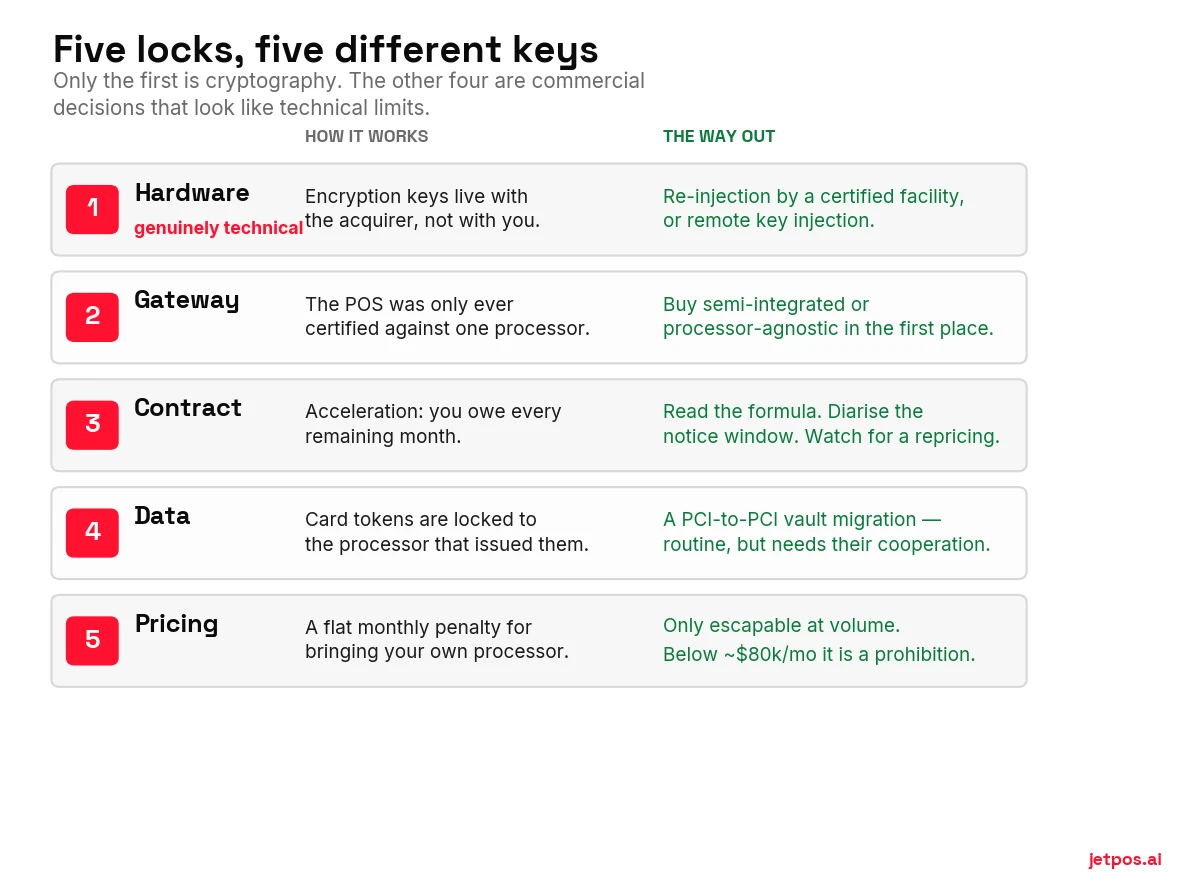
Lock 1 — The keys inside the terminal
This one is real physics, so it's worth understanding properly.
Modern PIN terminals use DUKPT — derived unique key per transaction. A base derivation key lives with the acquirer. From it, an initial key is injected into your terminal at setup; the device derives a chain of future keys and then discards the original. Every transaction burns one.
The consequence: only the party holding that base key can decrypt what your terminal produces. Point it at a different acquirer and the output is noise.
That is not a policy. But the fix is routine. Re-injection is performed by PCI PIN-certified encryption service organisations, which do it per processor — Chase Paymentech, Elavon, Fiserv, Global Payments, TSYS, Worldpay and Heartland each have their own keys — and remote key injection now removes the need to ship the box anywhere.
So the honest version is: an open-market Verifone, Ingenico or PAX terminal can usually be moved. A Square, Toast or Clover device cannot. And in Clover's case the barrier isn't cryptography at all — it's account provisioning plus a locked-down Android fork.
Lock 2 — What your software is allowed to talk to
Your POS speaks to exactly one thing, and what that thing is decides everything downstream.
| Architecture | What it means | Changing processors is… |
|---|---|---|
| Bundled | The POS vendor is the processor, or mandates one | Changing your POS |
| Single-gateway | Technically capable, certified against one gateway only | An engineering project you can't commission |
| Middleware / agnostic | POS integrates once against a payments abstraction layer | A configuration change |
Clover's developer documentation is unusually blunt about which camp it's in: "Clover does not support third-party payment gateways such as Authorize.Net. Clover merchants must use the built-in Clover payment processing system." Clover staff in the developer community say the same in plainer words.
Lightspeed's own support pages, across three product lines, state that "Lightspeed Payments does not integrate with any other payment processor or POS system," and that third-party terminals are not supported.
Toast puts it in its SEC filing, which is the most quotable version of this fact anywhere:
— Toast, Inc., Form 10-K for fiscal 2024
"Is your payment integration semi-integrated or fully integrated?"
In a semi-integrated design, the POS never touches card data — it hands the terminal an amount and gets back an approval. Your PCI scope drops from "large" to "minimal," and because the POS isn't coupled to one processor, you can change processors without changing systems. In a fully integrated design, card data flows through the POS, so the POS must be recertified for every processor — which is exactly why vendors who build that way only ever certify one.
The answer to that question predicts almost everything else in this guide.
Lock 3 — The clause that turns leaving into a purchase
People brace for a flat cancellation fee. The dangerous clause isn't flat.
Toast's SEC filing says its SaaS contract terms "generally range from 12 to 36 months." That part is current, and it comes from Toast.
The clause itself is harder to pin down, and the most-quoted version of it is old. A 2018 trade-press analysis of a Toast merchant agreement (§8.4) quotes an early-termination provision requiring payment "equal to all Software Subscription Fees… for the remainder of the then-current Term, plus any additional Fees for Services." Toast does not publish its merchant agreement, and we could not verify that this wording still appears in a 2026 contract. Read it as an illustration of the structure, not as a quote from the agreement you would sign — and ask for your own termination clause verbatim before signing anything.
Structurally, that is acceleration rather than a flat penalty, and the difference is the whole story. On a $400-a-month contract with 20 months left, acceleration produces $8,000 where a flat fee might produce $500. Because it is framed as fees you already agreed to rather than as a punishment, it is much harder to argue down. Whether a given acceleration clause is actually enforceable is a question for a lawyer in your jurisdiction, not a settled fact — we go through what courts have and haven't decided in the contracts guide.
Underneath that sits the classic trap: a separate, non-cancellable 36- to 48-month equipment lease from a different company entirely, which survives the death of your processing relationship and sometimes the death of your business. We took that apart properly in the guide to POS contracts.
Canada's Code of Conduct for the Credit and Debit Card Industry is not a statute. It is a set of commitments the card networks and their acquirers have made, administered by the Financial Consumer Agency of Canada, and it governs the payment side of your relationship. Within that scope it gives you leverage almost nobody publishes:
- A fee increase triggers a right to cancel without penalty within 70 calendar days of the change taking effect. Your provider must send you the cancellation documents within five business days.
- You must get 30 to 60 days' advance notice of any fee increase, and the notice has to tell you about that 70-day right.
- A related services agreement cannot exceed the duration of the primary agreement (Policy 7). Read that one carefully before leaning on it. It reaches services your acquirer bundles into the relationship. A terminal lease written by a separate leasing company that never signed up to the Code sits outside its scope — and that is precisely where the worst terms live. If the lease came from your acquirer, cite Policy 7. If it came from a third-party lessor, assume you are on your own and read the lease.
- Auto-renewals are limited to extensions of six months or less, and you can give non-renewal notice up to 45 days out.
If your processor raised your rates in the last two months, that clock may still be running. Note the boundary: the Code covers your merchant-acquirer relationship. It does not override a separate equipment lease or a software subscription sold by a company that isn't your acquirer.
Lock 4 — Your data, and specifically your saved cards
Two very different assets get conflated here.
Saved cards are held as tokens, and a processor token isn't a neutral credential — it's locked to that processor. Moving them means a PCI-to-PCI vault migration: a formal export request, and the actual card numbers move directly between two certified environments. You never touch them.
This is more available than the scare stories suggest. Square publishes the process — encrypted export to any PCI DSS Level 1-compliant processor, roughly two weeks, started by the account owner. Helcim quotes about ten business days. What's true is that it needs your outgoing provider's cooperation, and cooperation gets noticeably worse after an involuntary termination.
Operational data is where the pain actually lands, and Toast documents it on its own support site with admirable clarity: "At this time, there is no single export of your Toast data." Reports come down six months at a time across a 48-month history, and after you close the account you have 60 days of access.
Clover's export is a developer API, not a download button: 30-day ranges, 1,000 objects per file, and the files are deleted after 24 hours.
Lock 5 — The price of leaving anyway
The newest lock. Your vendor doesn't forbid an outside processor. It prices you out of one.
Lightspeed's own support site confirms that "merchants using non-Lightspeed Payments solutions will be charged a monthly third-party processing fee." Lightspeed has never published the amount. Third-party reporting puts it at $400 a month — treat that as reported, not as Lightspeed's own figure.
Here is why a flat penalty is a different animal from a percentage one.
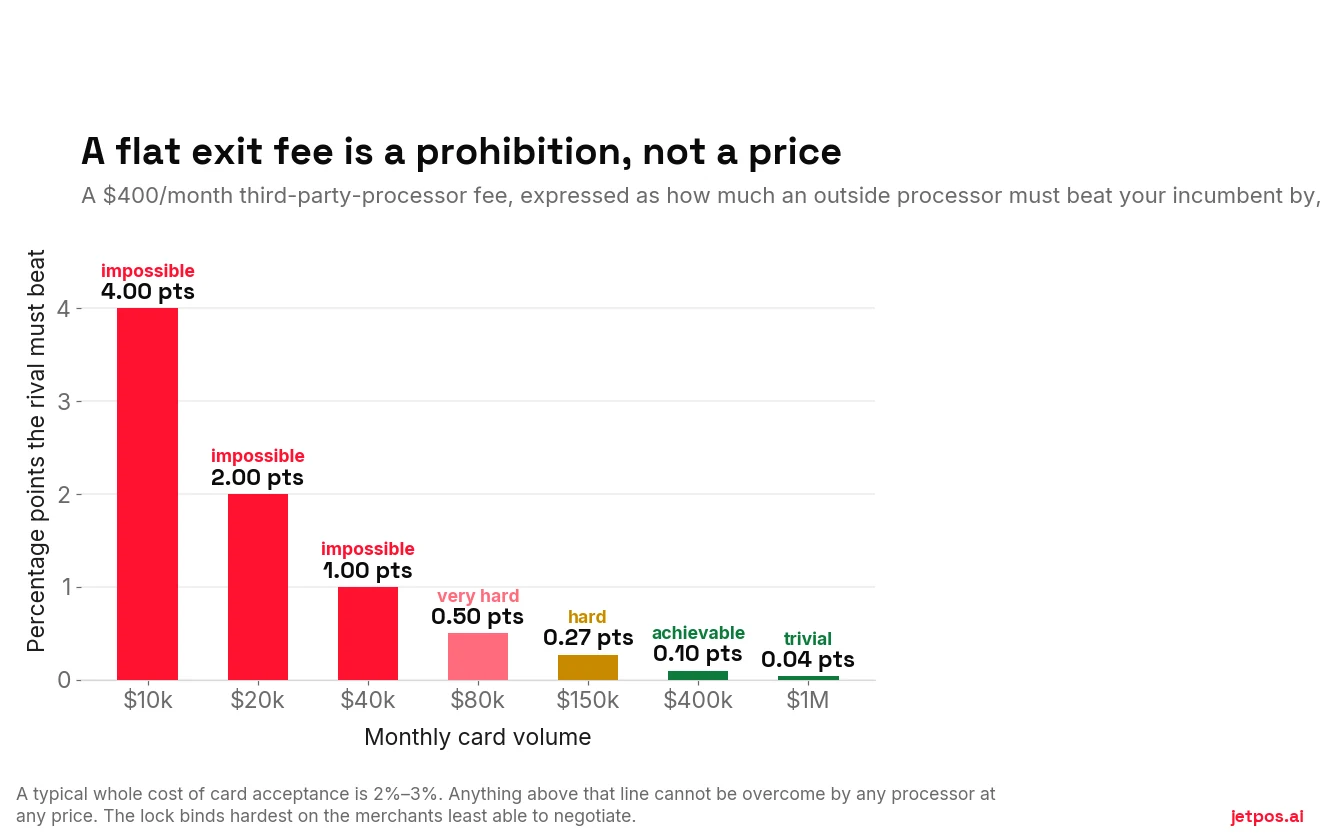
That chart is the whole mechanism. A flat "you may leave, for a fee" charge is calibrated so that the merchants least able to negotiate are the ones it binds hardest.
One fairness note: in late 2023 Lightspeed publicly committed to a "Meet or Beat" promise — if it can't match or beat your existing rate, it won't charge the third-party fee and won't require you to move. Reporting the penalty without that carve-out isn't accurate.
You will read everywhere that Shopify POS charges 2% if you don't use Shopify Payments. That is wrong for in-store sales. Shopify's own help centre: "Transaction fees don't apply for POS orders or for manual payment methods." Those percentages are online-checkout fees.
What you actually lose in store is the integration — you run the card on a separate terminal, create a custom payment type, and mark the order paid by hand. That's a workflow cost, not a percentage. Worth knowing which one you're actually facing.
Lock-in by vendor, in one table
| System | Hardware | Processor choice | Contract | Data export | Penalty to leave |
|---|---|---|---|---|---|
| Square | Locked | Square only | No term | Vault export published | None |
| Toast | Locked | Mandatory (per 10-K) | 12–36 mo, acceleration | "No single export" | Remaining fees |
| Clover | Locked to the reseller | Prohibited in Clover's docs | 1–3 yr + often a lease | Developer API only | ETF on contract and lease |
| Lightspeed | 3rd-party terminals unsupported | "Does not integrate" | Not published | Not established | Monthly fee, amount unpublished |
| Shopify POS | Readers for integrated pay | Allowed as custom payment type | Monthly | Standard exports | None on POS orders |
| Open POS + middleware | Open-market, re-injectable | 20+ processors | Typically none | Merchant-controlled | None |
Compiled from vendor documentation and SEC filings, September 2026. Square's card-vault export and Shopify's in-store position are both better than their reputations; verify anything here against your own order form before signing.
The settlement everyone's talking about — stated carefully
In June 2026 a federal judge granted preliminary approval to the revised Visa and Mastercard injunctive-relief settlement, calling it fair, reasonable and adequate. That's the "$38 billion" headline.
Three things need saying precisely, because the coverage has been loose.
- The $38 billion is a projected savings estimate through 2031, not a fund. Nobody gets a cheque. (The separate $5.54 billion damages settlement did pay out — and its claims deadline passed in February 2025.)
- The interchange cut is 10 basis points — 0.10% — for five years, on the combined average effective rate. The Merchants Payments Coalition — a lobby that campaigns against the card networks, so read it accordingly — puts the current average effective credit rate near 2.36%. Against that baseline the cut is roughly a 4% reduction. Real, but not a slashing. Nilson's figure for all card acceptance, credit and debit blended, is 1.57%, so the baseline you pick moves the percentage a lot.
- The "1.25% cap" covers standard consumer credit only, which is roughly 10% of consumer volume. The premium tier — around 85% — is uncapped. Any guide telling you swipe fees are now capped at 1.25% is misleading you.
Final approval hasn't been granted, and the National Association of Convenience Stores has said it will appeal to the Second Circuit if it is. The NRF, the National Grocers Association, the Merchants Payments Coalition and Walmart all opposed preliminary approval. A Second Circuit appeal routinely runs more than a year, so our own expectation — not a court's timetable and not anyone's published forecast — is that most operators see nothing on a statement before 2027 at the earliest. Plan as though the settlement changes nothing this year.
Why the settlement is a lock-in story
Here's the connection nobody is making, and it's the most useful paragraph in this guide.
The settlement's real value to a small operator isn't the 10 basis points. It's the new right to decline whole card categories and to surcharge by category, capped at 3% or your cost of acceptance, whichever is less.
A settlement can't override your state's law. Surcharging is still barred outright in Connecticut, Massachusetts, Maine, Oklahoma and Puerto Rico, restricted elsewhere, and never permitted on debit or prepaid cards anywhere in the US — that last one under Visa's and Mastercard's own rules, not, as is widely misreported, under the Durbin Amendment. In Canada, Quebec's Consumer Protection Act bars it and Interac debit is off-limits nationwide. The settlement widens what the card networks allow. It does nothing to the statutes. The map is in the surcharging guide.
Acting on either requires your POS and your processor to identify the card category at the terminal in real time, apply a category-conditional rule, and itemise it on the receipt.
If your POS and your processor are the same locked product, you get exactly the settlement rights your vendor decides to build. Lock-in converts a legal right into a feature request.
Is flat rate actually bad? Not always.
We should be honest about this, because the "always go interchange-plus" advice is oversold.
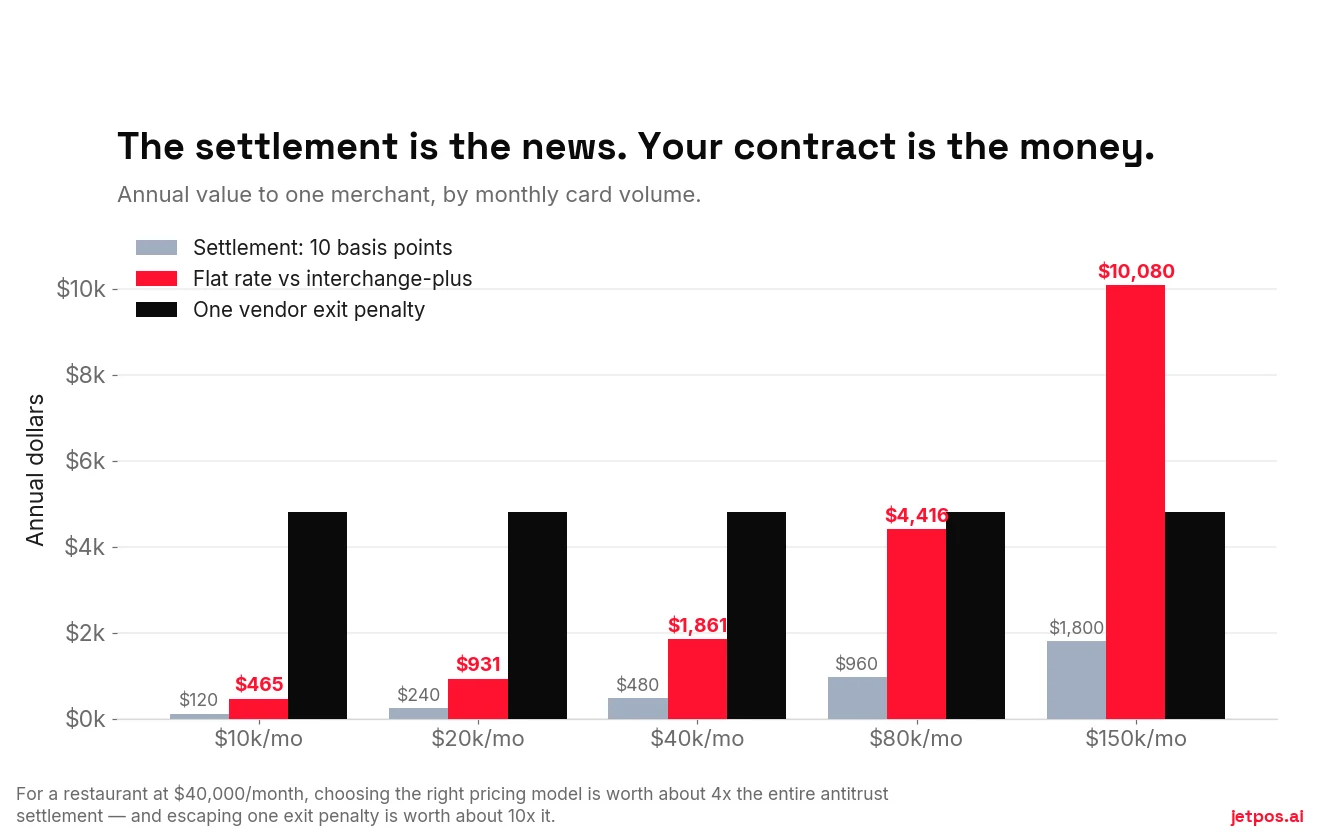
At $10,000 a month in card volume, the gap between a flat 2.6% + 15¢ and a published interchange-plus tier is around $465 a year. That's real, but it's less than one bad weekend, and the simplicity has value.
Here is how that number is built, so you can redo it with your own figures. $10,000 a month at a $45 average ticket is about 222 transactions, so 2,667 a year. Flat rate at 2.6% + 15¢ costs $3,120 in percentage plus $400 in per-item fees. Helcim's published interchange-plus schedule works out near 1.79% + 8¢ on a typical card mix, giving $2,148 plus $213, with no monthly fee. The gap is about $465. Drop the average ticket and the per-item fee starts to dominate, and flat rate looks worse.
The gap grows roughly in line with volume while your switching cost stays fixed. Somewhere between $20,000 and $40,000 a month, the annual saving crosses the cost of replacing hardware.
That crossover is exactly when lock-in starts costing you money — and it's the moment most people discover their hardware won't move. Which is why this is a purchase decision, not a renewal decision.
How to detect lock-in before you sign
- "Semi-integrated or fully integrated?" Ask first. If they don't know what you mean, ask for someone who does.
- "If I switch processors next year, what happens to this hardware?" Get a yes or no, in writing, not "we'd work with you."
- "Is there any fee for using a different payment processor, and how much?" If the amount isn't published, ask why.
- "What's the contract term, and is the termination fee a number or the remaining balance?" Ask to see the formula.
- "How do I export everything — catalogue, customers, sales history, saved cards — and how long do I have after cancelling?"
- "Do I own this hardware outright, or is it a lease? With you or a third party?" If it's a lease, ask for the leasing company's name and the total of payments.
- "After the settlement, will I be able to decline premium cards or surcharge by category?" A vendor with a real roadmap will have an answer. It's also a neat test of whether they're paying attention.
If you're already locked in
You have more room than it feels like.
- Find your renewal date and your notice window today. Put both in a calendar with a 60-day warning. This one act is worth more than most negotiating.
- Check whether a rate increase opened an exit. Many US agreements contain a penalty-free exit triggered by the provider's own repricing. In Canada it's not a maybe — the Code gives you 70 days.
- Export everything now, while you're still a customer in good standing. Catalogue, customers, sales history, and a formal vault-migration request. Cooperation drops sharply once you've given notice.
- Price the exit honestly. Remaining contract + lease balance + replacement hardware, against the annual saving. Sometimes the answer is to wait for the renewal date, and that's fine — the point is to know.
- Buy your way out of the next one. Whatever you move to, make it semi-integrated and make sure you own the hardware.
Where JET sits, honestly
JET is a POS that doesn't process payments. That's a business model choice, and it has a real consequence: we don't take a percentage of your card sales, so we have no rate to defend and no reason to care which processor you use.
You keep your terminal, your processor and whatever rate you negotiated. With an Ingenico Desk/5000 set to semi-integrated over USB, the sale total is pushed from the POS to the terminal so the cashier never re-keys an amount. Any other terminal works alongside JET too — the cashier just types the total.
Two things we won't pretend about. We don't sell you a processor and we won't quote you a rate, so shopping for one is on you. And a semi-integrated setup means two devices to look after instead of one integrated box, which is a genuine trade-off some operators would rather not make.
What we won't do is make the choice expensive later.
What we'd do on Monday
Find your merchant agreement and read three things: the term, the termination formula, and the renewal notice window. Ten minutes.
Then get one interchange-plus quote based on your actual statement, and calculate what switching would cost including hardware. If the number works and you're locked, at least now you know the price of the lock — and you can time your exit to the renewal date instead of paying to break it.
For a vendor-by-vendor view of the same subject, WHICHpos covers processor lock-in across nine systems.
Disclosure: WHICHpos is published by Solvr Solutions Inc. — the same company that makes JET. It is a sister site, not an independent referee. Read its scoring method and check its figures against the vendors’ own pages before you weigh anything it says about us.