
Every article you'll find on this question was written by someone who sells kitchen display systems. We know, because we read seven of them, and the one that used to rank first has been deleted since its publisher was acquired.
We don't sell a KDS. JET routes tickets to a kitchen printer. That makes us biased in the other direction, so we've tried to write the version we'd want if we were choosing — including the parts where the screen wins.
The short answer
Probably not, if you run one or two stations. A kitchen printer costs $280–$580 once, needs no network, and paper runs a few hundred dollars a year — often less than KDS software alone.
Buy a KDS when you have three or more stations, heavy delivery volume, coursed service, or you're losing tickets. Below that, a screen adds a subscription and a failure point without fixing anything.
Score yourself. Ten questions.
One point per yes.
| # | Criterion | Score a point if… |
|---|---|---|
| 1 | Station count | You have 3+ distinct prep stations that each need their own ticket |
| 2 | Ticket volume | 300+ orders a day, or sustained peaks above about 60 an hour |
| 3 | Delivery mix | More than about 25% of orders arrive from channels other than your own POS |
| 4 | Coursing | You fire apps and mains separately as a matter of routine |
| 5 | Ticket loss | You lose a ticket, or have a "did that go in?" moment, more than once a week |
| 6 | Printer failures | 2+ failures or jams in the last year that actually stopped service |
| 7 | Staff turnover | You're training a new line cook every month or two |
| 8 | Multi-unit | 2+ locations you want to compare on prep time |
| 9 | Batch cooking | All-day counts would genuinely change how your line works |
| 10 | Someone will own it | You can name the person who'll configure it, maintain it and read the reports |
0–2 points: don't buy a KDS. Buy a good impact printer, put it somewhere sensible, and spend the money on your menu or your people.
3–5 points: hybrid. One screen at expo, printers everywhere else.
6+: buy it — and keep a printer as backup.
A KDS nobody owns becomes a screen everyone works around. If you can't name the person who'll configure the routing, adjust the timers and actually look at the prep-time reports, the answer is no regardless of the other nine.
Kitchens that should not buy one
Said plainly, because most articles won't.
- The one-station counter. Deli, sandwich shop, single-cook café, one-line taqueria. One legible ticket is genuinely enough — and a KDS vendor we read says so in its own guide.
- Beverage-led concepts. Coffee, bubble tea, juice. You need cup labels, and a KDS can't print labels. You'd be buying a screen plus a label printer. Buy the label printer.
- Food trucks. Space, power, vibration, weather, no reliable network. A printer runs off the same inverter as everything else.
- Bars with no food. The bartender is the kitchen.
- Under 200 orders a day, two stations, no delivery. The arithmetic below favours paper and the operational gain is marginal.
- Anyone whose network is unreliable and hasn't fixed it. A KDS on bad Wi-Fi is worse than paper on any day of the week. If you can't hardwire the screens, don't buy them.
- Anyone mid-crisis. Don't change how tickets reach your line during a staffing emergency, an inspection remediation, or your first month open.
What a KDS actually does that paper can't
Four things, and they're not the four in most demos.
1. A ticket that tells you it's late
Tickets age by colour — green to yellow to red on Loyverse, configurable highlight schemes on enterprise systems.
This is the strongest genuine advantage, because a paper ticket does not tell you it is late. It sits in the rail looking exactly like every other ticket until food is late.
The partial workaround costs nothing: print the time on the ticket and keep the rail ordered by time. Most good kitchens already do. That recovers maybe half the benefit.
2. Recall
Bumped an order by mistake? On a KDS you bring it back in two seconds. There's a real distinction worth knowing: recall restores a completed order and restarts the cook timer, for a genuine remake, while review brings it back without restarting the timer, for checking what was on it. Typical window is the last 50 orders or 15 minutes.
The paper equivalent is a spike and a bin of bumped tickets you dig through. That is genuinely worse.
3. All-day counts
Items prepared the same way group into a production item — "fries," "patties" — with a running counter across every open order. The sophisticated version splits it into over and under counters: start these now, these are coming.
This is arguably the highest-return KDS feature for a batch-cooking line, and it's barely marketed. Check the tier before assuming you get it — one popular KDS puts ingredient all-day counts in its premium plan, not its base one.
4. Delivery consolidation
POS, first-party online, DoorDash and Uber Eats landing on one screen instead of a wall of tablets. With off-premise now a large share of restaurant traffic, this is the strongest modern argument for a KDS — and it's not the one vendors lead with.
One caveat: consolidation is usually a function of your POS's delivery integrations, not of the screen. You can often consolidate to a printer just as well. Don't buy a KDS to solve tablet sprawl if middleware would do it.
Routing by station. Items get assigned to a print group in the POS and mapped to an order device — beer to the bar, salad to the cold station, steak to the line. Printers and screens use exactly the same configuration table.
Anyone telling you a KDS gives you station routing a printer can't do is selling you something. What is genuinely screen-only is load balancing between two identical grill stations, production lanes that carry state between screens, and capacity throttling so a station never gets handed more than it can cook. Those matter to high-volume QSR and assembly-line pizza. They're worth nothing in a two-cook kitchen.
What it costs, both ways
The screen side
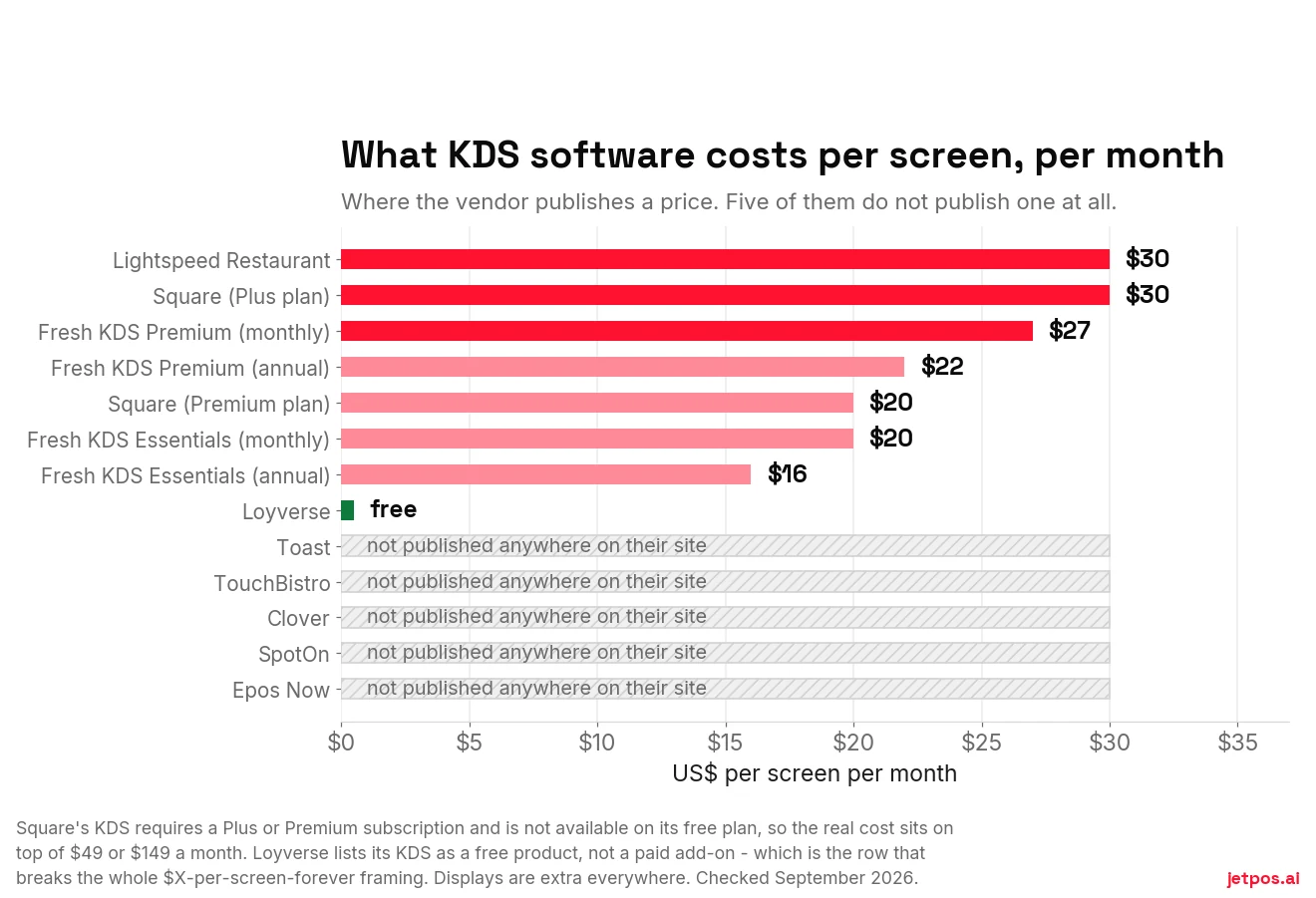
Note one detail that catches people: Square's KDS requires a Plus or Premium subscription. It isn't available on the free plan at all. So the real cost is $30 per device on top of $49 a month, not $30 on top of nothing.
Then add the display. Heat-rated commercial screens are widely quoted in the $400–$1,200 range, and proprietary vendor hardware higher — though we could not find a published retailer price list for either, so treat those as an estimate band rather than a fact.
The paper side
Hardware first, from retail listings — these are list prices from online retailers, and street prices through a reseller usually run lower, so treat them as a ceiling:
| Printer | Type | Price | Put it |
|---|---|---|---|
| Epson TM-U220D | Impact, parallel | $280 | Hot line |
| Epson TM-U220B | Impact, Ethernet | $484 | Hot line |
| Epson TM-m30III | Thermal, USB + Ethernet | $435 | Expo, bar, online orders |
| Epson TM-m30III | Thermal + Bluetooth + Wi-Fi | $482 | Expo, bar, retrofits |
Then paper. Standard 3⅛-inch rolls run about $1.97 each in a 50-roll case, or $1.33 for budget rolls — and $2.35 if you buy 10-packs, a 19% penalty for not buying by the case.
A 230-foot roll is 2,760 inches, so a 6-inch ticket with modifiers gets you about 460 tickets per roll.
One order does not print one ticket. An order with a beer, a salad and a steak prints three — bar, cold station, hot line — plus an expo summary makes four.
Every published cost comparison in this category divides orders by tickets-per-roll and stops there. At volume, the multiplier is the whole ballgame. Count your print groups, then multiply.
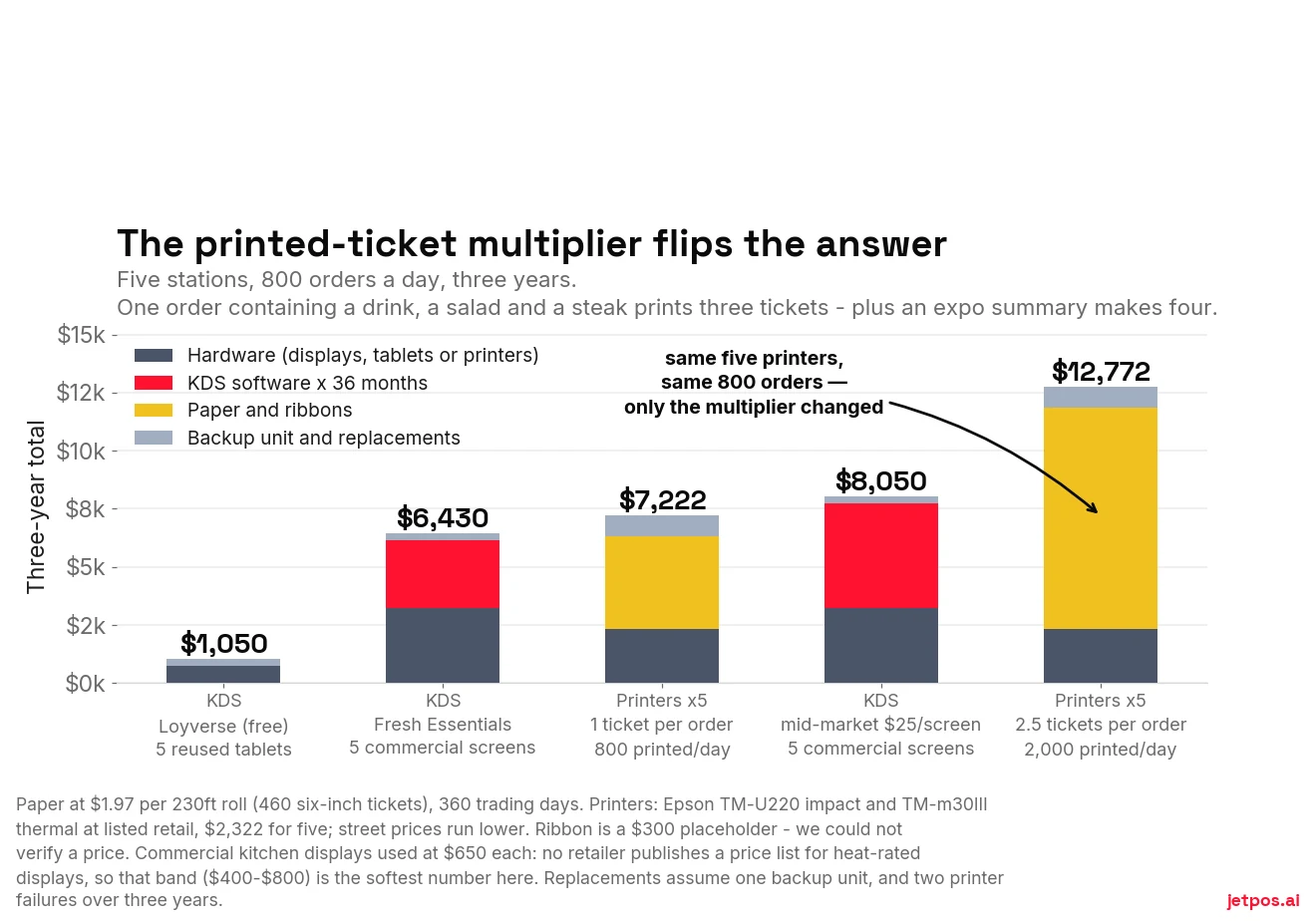
Two honest cautions about that chart. The multiplier is a modelling assumption, not a measurement — count your own print groups before you trust either printer bar. And the commercial-display price ($650 each) is the softest number in the whole model: no retailer publishes a price list for heat-rated kitchen displays, so it's a mid-point of a $400–$800 band that vendors quote and nobody documents.
At two stations the picture inverts again, and it inverts on which KDS you buy rather than on whether you buy one. Free software on reused tablets comes in around $580 over three years and beats printers comfortably. Subscription software on commercial screens comes in around $3,740 and loses to printers by roughly a thousand dollars. Any article telling you a KDS "costs more up front but pays back" is describing one of those rows and quietly hiding the other.
Impact or thermal — the mistake that costs the most
This is the single most consequential kitchen printer decision and most articles skip it entirely.
| Impact (ribbon) | Thermal | |
|---|---|---|
| How it prints | Pins strike an ink ribbon onto plain paper | Heat darkens heat-sensitive paper |
| Near heat | Stays readable near ovens, grills, steam and heat lamps | The ticket darkens. Then the printer dies. |
| Consumables | Paper and ribbon | Paper only |
| Noise | Audible — which is a feature on a loud line | Quiet; needs a buzzer |
| Colour | Two-colour on some models — red modifiers | Single colour |
| Belongs | The hot line | Expo, bar, online orders |
Impact on the hot line. Thermal everywhere else. A thermal printer over a grill will hand you black tickets and then fail.
And the two-colour capability on some impact models is genuinely underrated: modifiers printing in red is most of what allergen highlighting on a KDS gives you, for free, on paper.
Placement, which is half of reliability
- Not above or beside the grill, fryer, salamander or pass heat lamps
- Not under a hood edge where grease condenses — grease in the auto-cutter is the number one mechanical failure
- Not where it gets sprayed during washdown
- At eye level or above the work surface, so tickets don't land in liquid
- Cable-managed and strain-relieved. A printer yanked off a shelf by its own Ethernet cable is a self-inflicted wound
- Spare rolls within arm's reach — a two-minute walk to the stockroom mid-rush is an outage
- Keep a boxed spare printer above about 300 tickets a day. At $280 it's the cheapest insurance in the building, and it's the honest answer to "printers are unreliable"
The bilingual ticket nobody writes about
Almost one in five US workers is foreign-born, and foreign-born workers are over-represented in service occupations. A great many kitchens have a line that reads one language and a front of house that reads another.
Not one of the seven KDS-versus-printer articles we read mentions this once.
Enterprise systems have solved it for years: a menu item carries a second name, and an order-device option prints both names on the same ticket. Note the nuance that catches people — on some systems the secondary-language setting applies only to guest checks and customer receipts, not to kitchen output. Those are different options.
JET's software works the same way. An item has a Name and a 2nd Name, and the Kitchen Receipt setting has an Item Name option of "1st and 2nd Name" that prints both per item. English in the first field, Spanish in the second: the kitchen reads Spanish, the owner reads English, on one ticket, and reporting stays on the first name. One scope note, because we'd rather state it than be asked: this is the kitchen receipt setting specifically — don't assume the same option exists on every other document a POS can print.
If that describes your kitchen, ask any vendor you're evaluating whether their kitchen output can carry two item names. It's a two-minute question with an outsized answer.
What most good kitchens actually run
Not one or the other.
The best-sourced write-up we found puts it as "most operators running a KDS keep at least one impact printer as a backup," and nothing we read contradicted it. Enterprise KDS documentation includes a whole chapter on runner chits — paper tickets printed by the KDS, to travel with the food. KDS vendors sell label printers as accessories, and TouchBistro's own KDS page concedes that a screen cannot print a drink label.
Paper has a structural advantage a wall-mounted screen can never have: it can be handed to a person and carried.
| Configuration | Who it suits |
|---|---|
| Expo screen + station printers | The cheapest way to get most of the benefit. Screen gives timing and all-day visibility; the line keeps paper it can grab. |
| KDS everywhere + one impact printer as failover | When the network dies, tickets print. About $300, and you never think about it again. |
| KDS + label printer | Mandatory for beverages and delivery bags — anything needing identification after it leaves the pass. |
| KDS + runner chits | Screen runs the kitchen; a chit prints at expo so the runner knows the table. |
Claims we could not verify
We'd rather show you the gap than fill it with someone's marketing.
Widely circulated figures — that a KDS improves ticket times by 10–30%, that paper kitchens run a 2–5% order error rate, that a KDS cuts remakes by a third to a half, that around 60% of new North American restaurants adopt one — all trace back to vendor pages with no underlying study cited. One of the more honest sources labels its own numbers "directional, not a guarantee."
The only sourced adoption statistic we found in the entire literature is five years old.
That doesn't make the claims false. It means nobody has measured this properly, and you should discount any demo built on those numbers accordingly — including if someone quotes them at you to sell a printer.
Where JET sits, plainly
JET does not have a kitchen display system. Restaurants running JET route tickets to a kitchen printer — the 80mm, which connects over Bluetooth, USB or LAN.
If your score above came out at six or more, we are the wrong system for your kitchen, and we'd genuinely rather you found that out on this page than in week two.
If it came out at zero to two — which describes an enormous number of perfectly good restaurants — then the screen you were about to buy was a subscription, a display, and a new thing to fail on a Friday, in exchange for benefits your kitchen wasn't going to use.
What we'd do on Monday
Count your print groups — bar, hot line, cold station, expo — and score yourself against the ten criteria. It takes five minutes and it's a more honest answer than any demo.
If you're staying on paper: check whether your hot-line printer is impact or thermal, move it away from the heat lamp, put spare rolls within arm's reach, and buy a boxed spare. That's most of the reliability gap, for under $300.
If you're buying a screen: get the per-screen monthly price in writing, confirm which plan tier it requires, and ask what happens to tickets when the network drops.
For a restaurant-specific comparison across systems, WHICHpos covers restaurant POS with its scoring method published.
Disclosure: WHICHpos is published by Solvr Solutions Inc. — the same company that makes JET. It is a sister site, not an independent referee. Read its scoring method and check its figures against the vendors’ own pages before you weigh anything it says about us.