

Aman Narang, the co-founder and chief executive of Toast, described his own product's switching costs on NPR's How I Built This in a way no marketing department would have approved:
Aman Narang on How I Built This with Guy Raz, transcribed by Reforming Retail, 4 August 2026.
He wasn't complaining. He was explaining the business.
Merchant churn in restaurants runs somewhere between 25% and 45% a year, on a benchmark published by the payments company Clearly Payments — a vendor figure rather than an audited industry statistic, so treat the range as indicative. The same analysis finds merchants on embedded payment platforms retain two to four times better, and is explicit about why: increased switching friction and deeper integration into daily workflows.
Modern POS systems aren't stickier because they're better. They're stickier because leaving was designed to be hard.
It's still very doable. It just has to be done in the right order.
The short answer
You don't switch in a day — you switch in about two weeks and cut over in an hour. Read your contract first, because notice windows and auto-renewal set your earliest possible date. Export everything while you're still a paying customer in good standing. Build and test the new system in parallel. Then flip between services on a Tuesday.
Gift-card balances, loyalty points and house accounts are the parts that don't move themselves. They're also money you owe.
The three clocks that set your date
Most migrations go wrong because someone picks a go-live date before checking which of these is slowest.
- The contract clock. Your notice window and auto-renewal date set the earliest you can leave cheaply. Toast's agreement auto-renews for successive one-year periods with at least 30 days' written notice required to stop it.
- The import queue. Not your effort — theirs. Lightspeed's retail import team quotes 15 business days for inventory and 5–7 for customers, North America only, and it rejects badly formatted files. Toast's gift-card import takes three to four weeks. Start these on day one — and note that 15 business days from Day −11 is Day +10, so either build the catalogue yourself in parallel or move your cutover.
- The calendar. Never the week before a holiday, never a Friday, never during your busiest season.
Toast's merchant agreement allows it to change card processing rates on 30 days' prior written notice — and gives the merchant a right to terminate over that change without the early termination fee that would otherwise apply. But only if you cancel in writing before the new fees take effect.
Toast's termination fee is otherwise every remaining month of subscription for your current term. On a two-year deal at $69/month with 18 months left, that's over $1,200; on pay-as-you-go it's calculated at $150 per remaining month.
Most operators read a rate-increase email as bad news to absorb. It is actually a ~30-day countdown on the cheapest exit you'll ever be offered. Check whether one landed in the last month, and diarise the deadline before you do anything else.
What actually exports, by vendor
There is no POS data standard. Accounting has one. POS has nothing. Every vendor invents its own schema, identically-named fields mean different things, and "migration" is really export, re-map, re-import — with data able to fall out at each step.
| Data | Square | Toast | Clover | Lightspeed Retail | Shopify POS |
|---|---|---|---|---|---|
| Catalogue / menu | Clean | No UI export | Partial | Managed, 15 days | Clean |
| Modifiers / variants | Nested can't import | No export | Partial | Partial | Partial |
| Customers | Clean | Not in export set | Caps at ~1,000 | 5–7 days, 256 chars | 15 MB, no dupes |
| Sales history (as archive) | CSV | Nightly, purged in 7 days | 30 days/request, files die in 24h | Partial | CSV |
| Sales history (as live data) | No | No | No | Reporting starts day one | No |
| Gift-card balances | Import only, support-assisted | Import only, 3–4 weeks | Entitlement paperwork | Cannot import | Export shows last 4 chars only |
| Loyalty balances | No self-serve export | Not in export set | No documented export | Varies | Varies |
| House accounts / store credit | Manual | Manual | Manual | Cannot import | Manual |
Quoted from each vendor's published documentation, September 2026 — vendor documentation changes without notice, so confirm before you plan around a cell. Two things worth saying in the vendors' favour: Lightspeed's X-Series imports and exports gift-card balances by two-column CSV (its R-Series requires re-keying each card by hand), and Clover, for all its hardware lock-in, publishes a genuine developer API for merchant data export — the constraint there is 30-day request windows and files that expire in 24 hours, not an absent export.
The three tiers of data
Tier 1 — moves cleanly
Products, customers, employees. Every major platform imports a CSV. What breaks is modifiers and variants, which are the most vendor-specific object in any POS — Square states nested modifier relationships can't be configured by import at all.
Assume you rebuild your modifier tree by hand. That's the largest single labour cost in most migrations.
Tier 2 — exports but doesn't import
Your sales history. This is the misunderstanding at the heart of most disappointing migrations: many platforms import products and customers only. Lightspeed says it outright — reporting starts on day one.
The practical consequence: for twelve months your new POS cannot show you a year-over-year comparison. Keep the archive outside the POS, in your accounting system or as CSVs.
Tax rules also live here. Rates are trivial. Which items are exempt, prepared food versus grocery, eco fees, bottle deposits, city-versus-state layers, GST/QST/HST/PST by province — those get re-entered and re-tested every time. Get it wrong and you under- or over-collect on every transaction until someone notices. You owe it either way.
Tier 3 — the money traps
This is where migrations actually hurt.
It's an unredeemed balance on your books, held by a customer who will walk through your door next month and expect it honoured.
Lightspeed Retail: "You can't import customers' store credit, gift cards, or customers' outstanding balances." Shopify: "The standard CSV export includes only the last 4 characters of each gift card code." Toast will import them, but needs full unmasked numbers and balances, takes three to four weeks, and some migrated cards end up keypad-only. Toast's own guidance on what happens if you don't import them is admirably direct: you must manually keep track of balances and redemptions.
Loyalty points are the same shape with a softer edge. Square Loyalty has no self-serve balance export — the documented route is to phone their loyalty department for a CSV of phone numbers and points. Fair warning on that one: the Square Community answer stating it is old, and it is still the indexed answer, so confirm with Square support before you rely on it. Clover has no documented rewards export at all.
And a legal point before you write anything off. An unredeemed gift-card balance is money you still owe. Expiry rules differ by state and province, and several jurisdictions impose unclaimed-property or escheatment obligations on balances that go unredeemed. Toast puts it plainly in its own documentation: your restaurant is still liable for those past purchases. Never void outstanding cards to tidy up a migration — check your jurisdiction, or ask your accountant.
And the rule that governs all of Tier 3: every one of these degrades the moment you give notice. Both Toast's and Square's terms reserve the right to delete your data after termination. Export first. Always.
The 14-day runbook
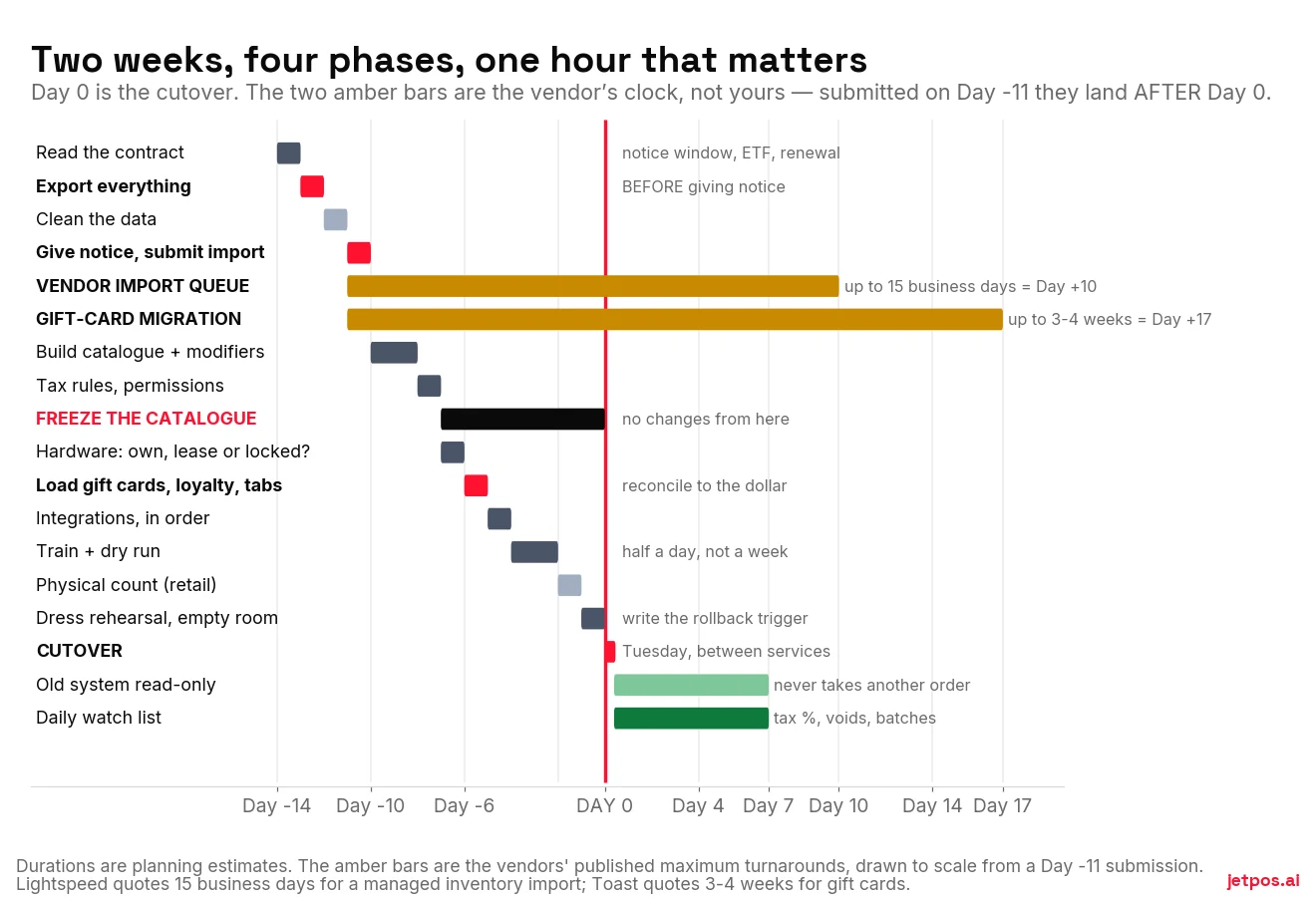
This is deliberate, and it's the thing most switching guides get wrong. You have two honest options:
- Build the catalogue yourself in parallel, which is what Days −10 to −8 below assume, and treat the managed import as a nice-to-have rather than the critical path. This is what lets a two-week plan actually work.
- Or wait for the queue and move Day 0 out to roughly Day +12 to +18. Slower, less of your labour.
Gift cards are the one you cannot build yourself. If the migration won't land before cutover, plan a manual bridge: keep the old balance list at the counter, honour cards by hand, and reconcile weekly until the import completes.
Before you accept any "we'll migrate it for you," get eight things in writing: the file formats accepted; the turnaround in business days; the exact field list they map, including barcodes, cost, tax class and modifier structures; whether gift-card and loyalty balances are in scope (usually not); who fixes rejected rows and how many revision rounds are included; whether there's a sandbox test import first; who signs off on the reconciliation; and the cost if it isn't free.
Days −14 to −11 · Contract and export
Day −14. Read the contract. Ninety minutes. Write down five things: your initial term end date, the auto-renewal period, the notice required to stop it, the termination formula, and whether you've had a fee-increase notice in the last 30 days. Then find the hardware agreement — it's often a separate contract, sometimes a non-cancellable third-party lease.
Day −13. Export everything, while still in good standing. Three to four hours. Do not give notice first.
- Product or menu catalogue, with barcodes, costs and tax assignments
- Full customer list
- Twenty-four months of transaction detail
- Gift-card list with full unmasked numbers and current balances
- Loyalty roster with point balances — phone the vendor if there's no self-serve export
- Employee roster and pay rates
- Tax settings, screenshotted
- Open house-account balances
- Supplier records with costs
Save two copies, one local and one cloud. Then open each file: do the row counts look right, are the date ranges complete, did accented characters survive?
Day −12. Clean the data. Three to four hours. De-duplicate customers. Standardise product naming as Brand / Product / Size. Purge SKUs with no sales in twelve months. Fix categories. Do this in the spreadsheet — fixing it after import is far harder.
Day −11. Give notice in writing, and submit the import. Email, not a phone call. Keep the confirmation. Hand the cleaned files to the new vendor the same day, because that's what starts the long clocks. Book the cutover date and treat it as fixed — open-ended migrations fail, because staff drift back to the system they know.
Days −10 to −6 · Build
Import categories first, then products against them — products can't reference a category that doesn't exist yet. Rebuild modifiers by hand and assume nothing survived. Re-enter tax rules class by class.
Day −7: freeze the catalogue. No new items, no price changes, no modifier edits from here to cutover. Every change after this has to be made twice.
Same day, sort the hardware. Confirm what's owned, leased or processor-locked, and order replacements now for anything locked — a Clover can't be reprogrammed for another processor, so plan on replacing it. Retail: confirm scanners and label printers. Grocery: book scale recalibration and certification, and start EBT or WIC reapproval now. Those are the longest leads in the whole project.
Day −6: load the money. Import gift-card balances, or produce the printed fallback list. Import or re-key loyalty balances. Enter house-account opening balances. Then reconcile the imported gift-card total against the old system's liability report to the dollar. This is the single most-skipped verification in the entire genre.
Days −5 to −1 · Test and train
Integrations, in this order: online ordering and aggregators, accounting (at a period boundary), payroll (at a pay-period boundary), inventory, then reservations and loyalty. Screenshot every integration's settings before you disconnect anything.
Training is half a day, not a week. Role-based sessions of about 30 minutes, then a dry run — two staff, ten real transactions, 30 to 45 minutes, tendered as cash and refunded afterwards to keep the books clean.
Model the five ugly cases, because these are what break on the night: a discounted sale, a refund, an exchange, a split payment, and a gift-card redemption.
Print laminated quick-reference cards for each terminal. Not a PDF. Nobody opens a PDF during a rush.
Set a readiness gate: every closing-shift member completes ten common transactions unaided.
Day −2, retail: do a physical count. Never import stale quantities. If a full count isn't feasible, import at zero and cycle-count within 30 days.
Day −1: full dress rehearsal in an empty room. Real cards, real check splits, real modifiers, real kitchen tickets, real receipt printing.
Before cutover, decide the exact condition under which you revert. For example: "more than three failed card transactions in the first 30 minutes, or till reconciliation off by more than $50, and we go back."
Deciding this in advance is what stops a bad night becoming a bad week. In the moment, with a queue at the door, nobody makes that call well.
Day 0 · The cutover — one hour
Restaurants: between lunch close and dinner open, Tuesday or Wednesday. Retail: after close, Tuesday to Thursday, so the first full trading day is quiet.
- Close out the old system. Print and save end-of-shift reports and the till reconciliation.
- Force-close every open tab and house-account charge. Nothing crosses the boundary.
- Take the final delta export — sales since day −13, and current inventory.
- Switch the terminals.
- Spot-check the five riskiest things: a gift-card balance lookup, a loyalty redemption, table or till status, a taxed item, a modifier chain.
- Soft-launch on two or three tables — or one register — before opening fully.
- Staff it properly. One trained person per terminal who is not handling food or serving, plus someone watching for stuck kitchen tickets. Have your vendor contact on a line they'll actually answer.
- Leave the old system powered on and logged in. Read-only. It never takes another order.
Days 1–7 · Parallel and stabilise
Check these daily for the first week:
- Nightly sales total against what the team says they did
- Tax collected as a percentage of sales, versus your historical rate — the fastest way to catch a mis-set tax rule
- Void and comp rates against normal; a spike means a workflow staff can't find
- Card batch settled and deposited to the right account
- Every gift-card and loyalty redemption attempted, with balances spot-checked
- Payment types reconciling — cash, card, gift, house account
- Printers still connected after a restart
- Twenty to thirty products spot-checked across categories for price and tax
Day 7: review the error rate and ship three fixes. Day 30: full month-end reconciliation, including gift-card and loyalty liability, which are balance-sheet items and must tie. Day 90: decommission the old system — after confirming the archive is complete and readable, and not before.
The accounting handoff
Cut over at a period boundary wherever you can. Give your bookkeeper the final old-system P&L and sales-tax report, the opening balances, the gift-card and loyalty liability totals at cutover, and the archive location.
On retention: the IRS baseline is three years, six if income was materially understated, and at least four for employment tax records. Canada is stricter and catches people out: the CRA requires six years from the end of the last tax year the records relate to, and electronic records must be kept in an electronically readable format for that whole period. A PDF dump or a box of printouts doesn't satisfy it. Keep the CSVs.
How long does a catalogue actually take to build?
Three methods, and the difference between them is most of the project.
| Method | How it works | What it needs | Where it fails |
|---|---|---|---|
| Spreadsheet import | Export from the old system, clean, import | A usable export from the old system | Modifiers and variants; column-order rules; SKUs corrupted by opening the CSV in a spreadsheet |
| Barcode scan | Scan each product; the system looks up the code and fills in the name | A product database with good coverage of your mix | Private label, produce, bulk, imported goods — nothing has a barcode to look up |
| Manual entry | Type everything | Time | Nothing. It always works. It just costs days. |
One honest note, since we sell a system that does the second one: nobody publishes a real hit rate for barcode auto-fill. Not the POS vendors, not the barcode-database companies. We looked. The databases are enormous — the big public ones hold hundreds of millions to over a billion entries — but coverage of your shelf is the number that matters, and it's undocumented across the entire industry.
What's safe to say: it works well on branded packaged goods and not at all on things without a printed barcode. Plan for a mix of methods.
What we'd do on Monday
Two things, in this order, before you talk to a single salesperson.
Find your contract and write down the renewal date, the notice window and the termination formula. Then check whether a fee-increase notice arrived in the last 30 days, because that may be a free exit with a deadline on it.
Then export everything, today, while you're still a customer nobody has any reason to be unhelpful to. Even if you end up staying. A clean export of your catalogue, customers, gift cards and 24 months of sales costs you an afternoon and is the single best insurance policy you can buy against every scenario in this guide.
For a side-by-side view of how the major systems compare before you pick a destination, WHICHpos has a switching guide of its own.
Disclosure: WHICHpos is published by Solvr Solutions Inc. — the same company that makes JET. It is a sister site, not an independent referee. Read its scoring method and check its figures against the vendors’ own pages before you weigh anything it says about us.